Free · Nothing uploaded · JPG is the default output
HEIC to JPG Converter
Turn iPhone HEIC photos into JPG files in this tab — one at a time or twenty at once. The decoding runs on your own machine, so there is nothing to upload and nothing to install.
Choose output format
Drop your HEIC photos here
or click to choose files · .heic / .heif · up to 30 MB each, 20 per batch
Something wrong?Report it— opens your mail app with the page path and browser details pre-filled. Your photos and files are never included.
Conversion runs entirely in your browser with a local decoding engine. Your photos are never uploaded to a server. Very large photos or large batches take longer in a browser tab than in native software. Limits: up to 30 MB per photo, 20 photos per batch, 100 MB per batch.
Hands-on test · ran 16 Nov 2026 on this live page
What nine real photos came out like: full resolution, SSIM 0.997 or better
We put nine 1600×1200 photos through this page in a headless Chrome, downloaded every result with its own Download button, and compared each JPG against the pixels the HEIC decoded to. All nine kept their frame, the worst one scored SSIM 0.997, and nothing failed. The test HEICs were re-encoded from JPEG at quality 90, so read the size column as this corpus only — the quality numbers are what this tool owns.
- 9 / 9photos converted0 failures, 0 console errors
- 1600×1200frame keptno downscale, every file
- 0.997worst SSIMmean 0.998
- 6.3 sper photobatch of 9 in 57 s
- 46%JPG size vs HEICtest-corpus HEICs, see limits
Every file in the run (9)
| File | Size in | Size out | SSIM | PSNR |
|---|---|---|---|---|
| test_1015.heic1600×1200 | 947 KB | 444 KB 47% | 0.998 | 44.5 dB |
| test_1025.heic1600×1200 | 779 KB | 338 KB 43% | 0.998 | 47.8 dB |
| test_1039.heic1600×1200 | 1121 KB | 533 KB 48% | 0.997 | 42.5 dB |
| test_1043.heic1600×1200 | 1213 KB | 612 KB 50% | 0.998 | 43.5 dB |
| test_1050.heic1600×1200 | 836 KB | 391 KB 47% | 0.998 | 46.8 dB |
| test_1060.heic1600×1200 | 513 KB | 191 KB 37% | 0.998 | 51.4 dB |
| test_1074.heic1600×1200 | 523 KB | 232 KB 44% | 0.999 | 51.9 dB |
| test_1080.heic1600×1200 | 922 KB | 421 KB 46% | 0.997 | 41.6 dB |
| test_1084.heic1600×1200 | 708 KB | 329 KB 46% | 0.998 | 48.9 dB |
File names are the corpus files we uploaded, not the names a visitor would see.
How we ran it
- Nine 1600×1200 photographs were re-encoded to HEIC with libheif at quality 90 to build the corpus.
- Headless Chrome 157 (Windows 11, Ryzen 7 7840HS, 25.7 GB RAM) opened https://heicjet.com/heic-to-jpg/ and dropped all nine into the real upload box in one batch.
- Each converted result was saved through the page's own Download link — no server-side or script shortcut.
- Output files were decoded and compared with their source HEIC decode using Gaussian-windowed SSIM (σ=1.5, K1=0.01, K2=0.03, L=255) and PSNR on the RGB channels.
- Whole batch took 57.0 s wall clock on one machine, with 0 failed files.
What this run does not show
- These HEICs are JPEG photos re-encoded to HEIC at quality 90, not files straight from an iPhone — that is why the JPGs here are only 46% of the HEIC bytes. The ratio says nothing about iPhone HEIC vs JPG.
- One machine, one browser. A mid-range phone or a 30 MB photo will take longer than the 0.5–1.2 MB files used here.
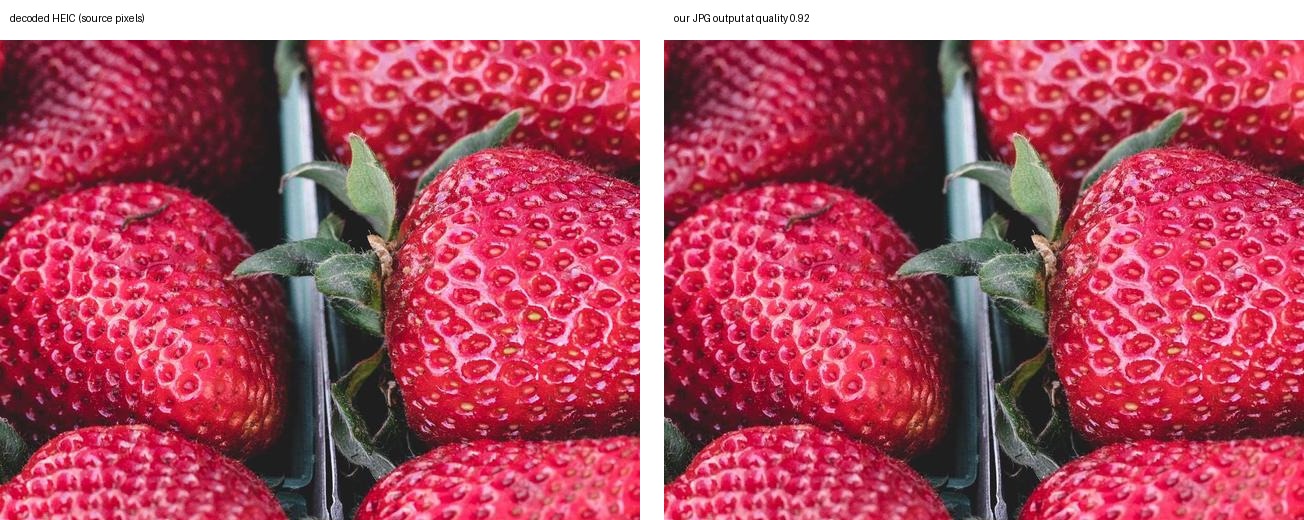
- SSIM and PSNR are pixel metrics, not a human panel. The 100% crop above is there for your own eyes.
- This run did not test the other claims on this page: EXIF preservation, the 20-file / 100 MB batch limit, or PNG and PDF output.
Numbers above are read from the full run record (JSON, 9 files, per-file SSIM/PSNR) — the same file this page was built from.
How to convert HEIC to JPG
- Choose the output — JPG is already selected; PNG and PDF are one click away.
- Drop your HEIC photos — one file or up to 20 in a single batch.
- Download the JPGs — each converted photo gets its own download button.
No Convert button and no waiting screen: conversion starts as soon as the file lands. For the longer walkthrough — including the built-in routes on each platform — seehow to convert HEIC to JPG.
Why HEIC needs a JPG copy
HEIC packs a photo into roughly half the space a comparable JPG needs, which is why iPhones default to it. The format is the problem, not the picture: Windows machines without the HEIF extension show an error, Android phones often see a grey thumbnail, and plenty of upload forms reject the extension outright.
A JPG has none of those edges. It opens in Photos, Office, every browser and every print shop, which makes it the safe format for anything that has to leave your phone.What is HEIC? explains the container in more detail.
JPG or JPEG — two names for one file
“HEIC to JPEG” and “HEIC to JPG” are the same request. JPEG is the format; .jpgis the three-letter spelling that survived from Windows versions which only allowed three-character extensions, and .jpeg is the original four-letter one. macOS and most photo apps write .jpg, some cameras and Linux tools write.jpeg, and .jpe turns up occasionally. All of them open as JPEG in Photos, Word and any browser, so the output of this converter works either way.
This converter names its output .jpg. If a form, printer or upload dialog insists on .jpeg, rename the converted file — the bytes are already JPEG and renaming them changes nothing. The one rename that never works is .heic to.jpg: that leaves HEIC bytes under a JPG name, and viewers still refuse them.The step-by-step guide covers why, plus the built-in route on each platform.
Converting a whole batch
Drop up to 20 photos at once — 30 MB each, 100 MB per batch — and the list fills with download buttons as each one finishes. Files are processed a couple at a time so the tab stays responsive, which means a big batch trickles in rather than landing all at once.
For the full limits, the queue behaviour and what to do when a batch is too large, seebatch HEIC to JPG conversion.
Quality control: what happens to the pixels
The resolution never changes — every photo is decoded at its original pixel size and the JPG keeps those dimensions. Encoding uses a fixed high quality setting rather than a slider, because the honest variable here is the format, not the number: JPEG throws away the finest detail on purpose, and nudging quality up mostly grows the file.
If you need an exact copy of the pixels, convert to PNG instead:HEIC to PNG keeps everything losslessly, at a much larger file size. Photos for screens and sharing are fine as JPG.
Convert on your platform
Same converter, different built-in shortcuts. Pick the route that matches the machine you are on.
On a Mac
Preview export, Finder’s Convert Image quick action, or Photos — no extra software needed on any Mac that can open the photo.
On Windows
Install the HEIF extension once for Photos and Paint, or skip the admin rights and convert in the browser.
For email
Attach a JPG instead of a HEIC and every recipient can open it — sizing guidance included.
In batches
Twenty photos in one run, each JPG downloadable as soon as it is ready.
HEIC to JPG FAQ
What is a HEIC file, and why do I need to convert it?
HEIC is the still-image container iPhones have used since iOS 11: it stores photos with better compression than JPG, so more photos fit on the device. The catch is compatibility — Windows machines without the HEIF extension, older Android phones, many web forms and some email clients cannot open it. Converting to JPG produces a file that basically every device and website already reads. Our HEIC explainer covers the format itself.
Do I need to install software to convert HEIC to JPG here?
No. Decoding and encoding both run inside this browser tab with a decoding engine the page loads from this site, so there is nothing to install, no extension, no account and no upload endpoint. Your photos stay in the tab and are discarded when you close it.
Does converting HEIC to JPG lose quality?
Both formats are lossy, so this is a lossy-to-lossy step: the JPG is re-encoded at a high quality setting, which approximates the finest detail rather than storing it exactly. Photos look the same at screen size; pixel-accurate work (screenshots of text, line art, print masters) is better with PNG output, and the HEIC original is worth keeping either way.
Is it free, and how many photos can I convert at once?
Free, with no account, no signup and no watermark, and you can run as many batches as you like. One batch takes up to 20 photos, each up to 30 MB, and up to 100 MB in total — very large photos go faster in smaller groups.
Is this the page for “hect to jpg”, “heic jpg” or “turn heic into jpg”?
Yes — those are the same request with a typo or different wording. Also: hect to jpg, heic jpg, heic to jpeg and turn heic into jpg all land on this converter. Drop the file and JPG output is already selected.
Convert a HEIC photo to JPG now
Free, unlimited, and your photos never leave this tab.
Choose your photos